Externalize AI reasoning into interactive diagrams that humans and AI can inspect, edit, and build together.
Arcgram turns AI reasoning from hidden text into a shared visual workspace. Complex workflows become easier to understand, review, and evolve across people, sessions, and AI agents.
What is Arcgram?
Build with AI. Think together.
Arcgram is an AI reasoning visualization engine built for human–AI collaboration.
Instead of producing another long block of text, your AI creates a structured diagram — typed nodes, clear relationships, and a stable layout on the canvas. You can zoom in on a single decision, adjust one reasoning step, and keep building on the same foundation.
The result is a shared reasoning workspace where humans and AI work on one structure together, instead of rewriting the same conversation over and over.
Arcgram isn’t just a diagramming tool that happens to work with AI. The diagram is the collaboration surface — a place where reasoning is pinned to specific coordinates so you can point at it, question it, and improve it.
Why visual reasoning?
Reasoning becomes something you can point to.
In a typical AI chat, all the logic is buried inside paragraphs. Fixing one mistake usually means regenerating a whole response and hoping it comes out better.
Arcgram makes the reasoning visible. It turns it into a graph: every idea has a place, every connection is explicit, and every decision stays easy to inspect.
Instead of saying, “the third paragraph feels wrong,” you pick out a specific node, look at its assumptions, adjust its connections, and let the AI continue from that corrected state.
Once the AI commits to “this node, here,” its thinking stops being a paragraph you have to trust and becomes a structure you can audit. That shift cuts ambiguity, repeated explanations, and reasoning drift.
Designed for human + AI workflows
One shared language across every AI.
Arcgram is model-agnostic. The same diagram can be created, reviewed, and extended by different AI systems without changing its structure.
Whether your workflow runs on Claude, ChatGPT, Gemini, Cursor, Continue, Cline, Aider, or a local model, everyone works on the same visual reasoning graph instead of juggling separate conversations.
As your workflow matures, the conventions you settle on become part of the graph itself. The next agent inherits your structure and established practices automatically, instead of relearning them from scratch.
Simple by design
One HTML file. Zero dependencies.
Arcgram ships as a single standalone HTML file.
No installation. No build step. No npm packages. No cloud backend. No runtime dependencies.
Open it in any modern browser and start building. Everything renders locally from a small structured data block, which makes each diagram easy to share, version, archive, or embed directly into your existing documentation.
Key features
Built for reasoning, not just drawing.
Arcgram combines interactive visualization with workflow features designed specifically for AI collaboration.
- Interactive workflow diagrams — map complex systems with typed nodes and explicit relationships; pan, zoom, and hover for more detail.
- Thinking-flow decision nodes — represent decision points as diamond nodes, with branch visualization and critical-path highlighting.
- Subflow drill-down — expand any node into a nested workflow without losing sight of the surrounding context.
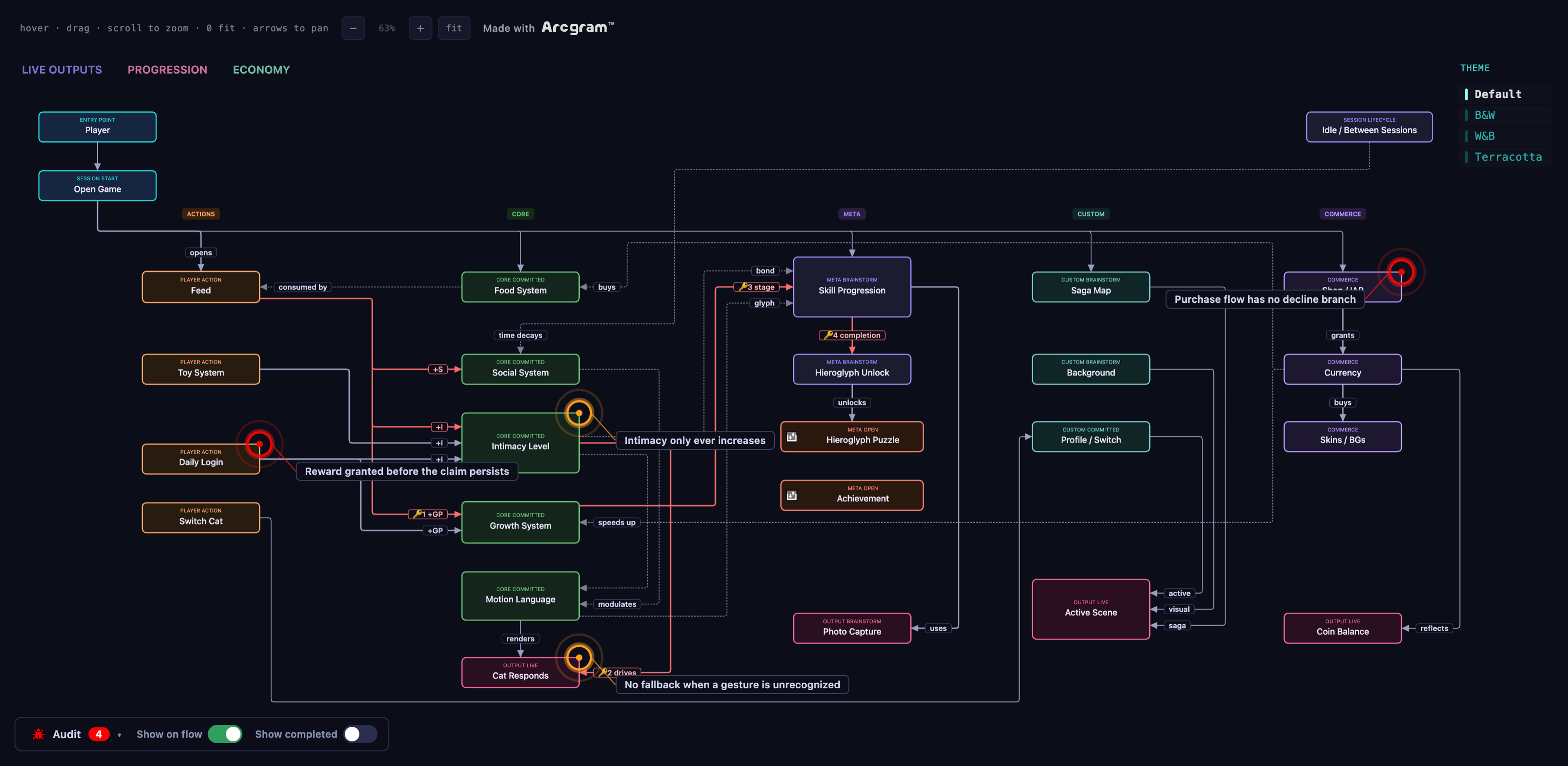
- Audit markers — pin open questions or issues directly to nodes with visual indicators and contextual notes, without disturbing the layout.
- Canvas spotlight — filter the canvas to focus on a single subsystem while keeping the overall structure in view.
- Vertical and horizontal layouts — switch orientation while preserving logical grouping and collision-free positioning.
- Theme switching — choose from multiple visual themes for different environments and preferences.
Who is Arcgram for?
Made for teams building with AI.
Arcgram is especially useful for:
- AI agent workflows and multi-agent collaboration
- Software architecture and system design
- Technical documentation and workflow documentation
- Prompt engineering and AI reasoning visualization
- Knowledge graphs and interactive architecture diagrams
Whether you’re documenting a production system or coordinating several AI agents, Arcgram helps everyone work from the same source of truth.
Open source & the full edition
Same logic. Different polish.
The open-source edition on GitHub is logic- and feature-complete — every node type, interaction, and the full authoring skill, free to use. What it doesn’t promise is output polish: an agent drawing with the public edition can still hand you a valid but rough-looking diagram.
Every example on this site is rendered at full-edition output quality. For the full or a customized edition, get in touch directly.
Frequently asked questions
Arcgram, in plain answers.
What is Arcgram?
Arcgram is an AI reasoning visualization engine built for human–AI collaboration. Instead of returning another wall of text, your AI agent draws its reasoning as an interactive node-and-edge diagram — typed nodes, explicit edges, and concrete coordinates — delivered as a single standalone HTML file you can open, pan, zoom, and correct by pointing at a specific node.
What can Arcgram do, and what is it used for?
Arcgram turns AI workflows, agent reasoning, system designs, and technical documentation into interactive flow charts that humans and AI can inspect, edit, and build on together, with the human in the loop. It supports decision nodes, subflow drill-down, canvas filtering, vertical and horizontal layouts, theme switching, and audit markers — and every diagram is a single standalone HTML file with no build step, no dependencies, and no runtime.
Is Arcgram the same as Archigram?
No. Arcgram (spelled a‑r‑c‑g‑r‑a‑m) is an interactive diagram engine for human–AI collaboration, created by Rae Sun. It is unrelated to Archigram, the 1960s British architecture group. If you searched for “Arcgram” and were shown Archigram, this is the tool you were looking for — for drawing and auditing AI reasoning.
How is Arcgram different from Mermaid?
Mermaid renders a static flow chart from text. Arcgram is built for collaboration and self-audit, not just rendering: the diagram is the shared workspace, every generated flow is checked by an automated geometry gate suite, and the AI marks its own findings on the canvas. It’s an interactive, auditable alternative for when you need an AI agent’s reasoning to be point-at-able, not just drawn.
Can Arcgram visualize AI agent workflows and loops?
Yes. Arcgram is model- and framework-agnostic — it visualizes the reasoning and structure of AI workflows, agent loops, harnesses, and multi-agent systems, whether they run on Claude, GPT, Gemini, LangChain, a custom agent framework, or a local model. It was recently used to map an entire agent operating framework as a single Arcgram flow.
Does Arcgram audit an AI agent’s reasoning?
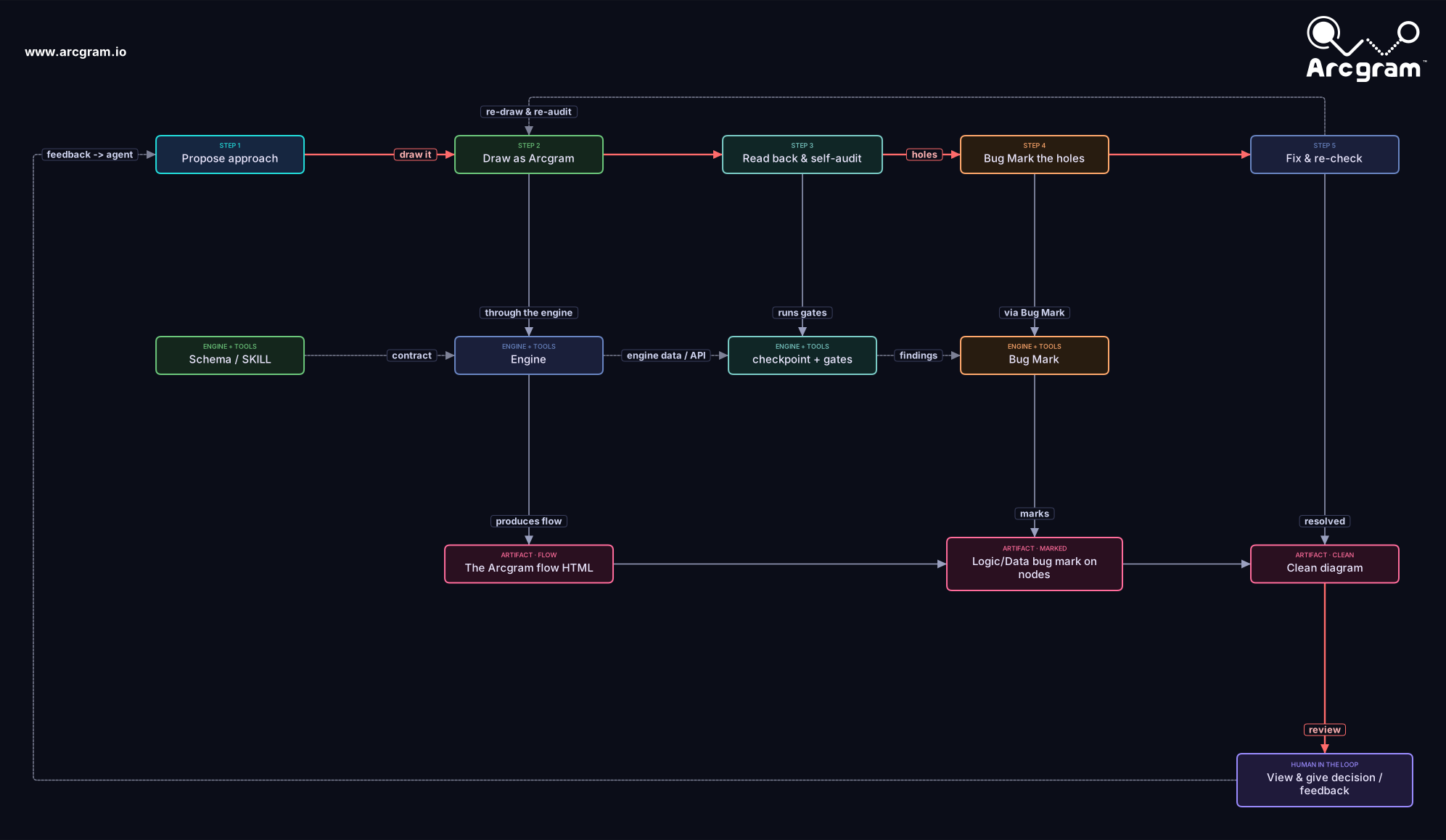
Yes. The agent draws its plan as an Arcgram flow, reads it back, and self-audits it against a suite of geometry gates; issues become red Audit markers pinned to the exact node, each with a note. A red is fixed, never waved through — so the diagram is a plan you can verify, not just a picture.
Is the open-source version the same as what I see on this site?
Logically, yes; visually, not guaranteed. The public GitHub edition is logic- and feature-complete — every node type, interaction, and the full authoring skill. Output polish is where editions differ: the examples on this site are rendered at full-edition quality, while the public edition can produce rougher layouts. For the full or a customized edition, contact the author directly.
See Arcgram in action
Open a live example in your browser.
No install. No account. Just open a page and start exploring. Pan, zoom, hover over a node, and follow the critical path:
- A small game loop canvas filter, columns, tooltips, critical path
- Thinking-flow: in-battle dialogue decision diamonds, branch coloring
- How the workflow works the propose → draw → self-audit → fix loop, human in the loop
- Audit showcase findings pinned to nodes, each with a hover note
Want to build your own? Open template-v2.html, edit the small data block at the top, and reload — that’s the whole workflow.
Open source
Open by design.
Arcgram is released under the Apache License 2.0 — free for both personal and commercial use. The project is intentionally lightweight, portable, and transparent, so it’s easy to inspect, extend, and fit into your existing workflows.
Every diagram carries a “Made with Arcgram” attribution by default; an unbranded build is available under a separate commercial license.
Arcgram and the Arcgram logo are trademarks of Rae Sun. See the project repository for full licensing and trademark information.
From conversations to shared understanding
Large language models are very good at generating ideas. Arcgram focuses on something different: turning those ideas into structures that people and AI can inspect, discuss, improve, and reuse together.
The future of AI collaboration isn’t about longer conversations. It’s about shared reasoning.